

 CS2
CS2Team Spirit CS2 Wins the 2026 EWC, Defeats FUT Esports
Team Spirit has defeated FUT Esports to win the 2026 Esports World Cup Counter-Strike trophy. Let’s recap the game and its impact.
23 Aug 20263 min
CS2Counter-StrikeHere are Team Spirit Counter-Strike pro donk’s settings in 2026, including crosshair codes, mouse sensitivity, and keyboard info.
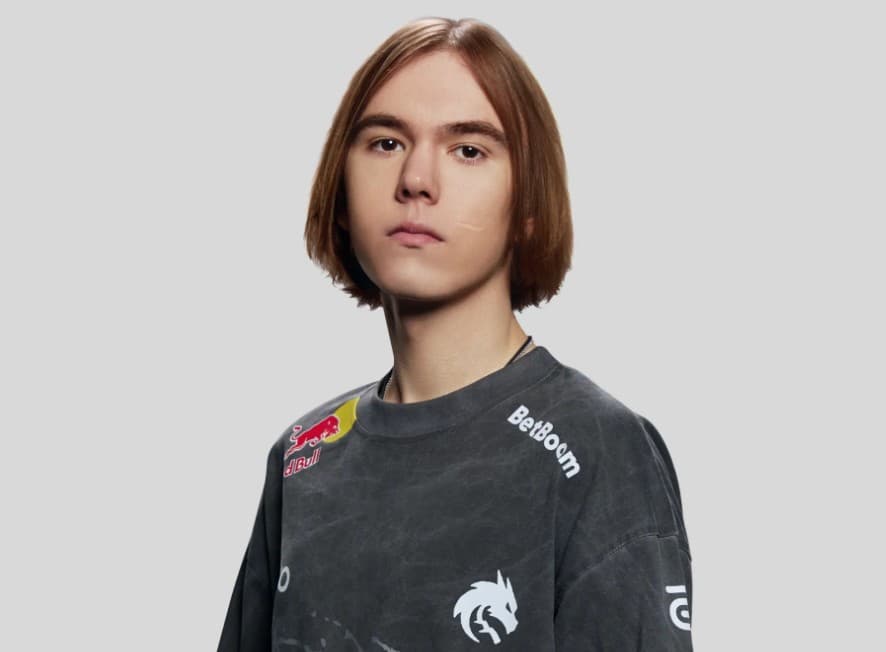
CS2 pro donk in a Team Spirit jersey. Image Credits: Team Spirit via Website
Danil ‘donk’ Kryshkovets is one of Counter-Strike‘s biggest stars. He’s known as a young prodigy, beginning his competitive career with Team Spirit at just fourteen years old. He quickly ascended from the Academy team to the main roster, becoming known for his aggressive playstyle and crisp aim. Five years later, donk has already won the Shanghai 2024 Major and recently defeated Team Falcons to score 1st place in PGL Astana 2026.
donk has now hit the highest recorded FACEIT CS2 ELO, peaking at 5,434. He is one of the strongest Riflers in the game’s history and has won dozens of MVP awards and trophies. Playing like a pro can feel out of reach, but things get a little easier if you know what settings to use. Today, we’ll take a look at all of donk’s settings in 2026, including his keyboard config, crosshair, and mouse sensitivity.
Before we dive in, here’s a summary of all donk CS2 settings in 2026.
In CS2, donk plays with a ZOWIE mouse with DPI 800, in-game sensitivity 1.25, zoom sensitivity 1, eDPI 1000.
Throughout the years, donk has used many different crosshairs. He tends to prefer a cyan color, with classic static style and length 1, thickness 1, gap -4. These are a few of his most recent picks.
Now, peripheral brand Wooting has officially revealed donk’s keyboard settings. The Wooting is a popular keyboard for FPS players, since you can change features like actuation distance (how far you have to press the key before it registers), lighting color, and more. Users also customize the entire build, choosing a main module size, switches, and keycaps.
For his main module. donk uses a Wooting 80HE. This is an 80% keyboard, which is slightly more compact as it doesn’t have an extra numpad. It’s a low-latency analog setup.
You asked for it… here is @donk1337 ‘s wooting setup: 14867b251ec6bd47514f576aa547df5e7289 Config: 80HE Module 80HE Frost Case Tikken Medium Switches
— Wooting @ COE 🇳🇱 & ChinaJoy 🇨🇳 (@WootingKB) August 1, 2026
The module is inside an 80HE Frost Case. This is a bright white colorway with a touch of grey. It matches Team Spirit’s grey, white, and blue color palette.
Finally, donk has picked out Lekker Tikken medium switches. These attach the keys to the main module, providing a cushion that registers input. The Tikken switches also fit Team Spirit’s theme, since they are a bright turquoise. These switches are typically quite quiet. They prioritize stability and won’t wobble if you have shaky fingers. They also have a longer spring than alternatives, so it’s harder to accidentally trigger them.
So, to summarize, donk’s 2026 keyboard settings are:
donk’s keyboard has a profile code so that players can import it into their own setups. Here it is:
donk’s Wooting profile: 14867b251ec6bd47514f576aa547df5e7289
You can import this profile by going to the Wooting App, pressing My Profiles, clicking Import Profiles in the top right, and copying and pasting donk’s code into the pop-up box. After it’s added, you can just drag it to your Active keyboard slots.
Through part of 2026. donk used a classic four-point crosshair. It has a bright green color, so it’s easy to follow against Counter-Strike’s muted map tones. The inner lines are quite short and chunky, and the crosshair itself stays pretty small. Here are the specifics:
donk’s crosshair code: CSGO-J29Jc-WDCwx-VdLUG-szY5O-33LsE
You can import a Counter-Strike crosshair by opening the game, going to Settings, clicking Game, clicking Crosshair, selecting Import, and pasting the crosshair code you want in.

donk uses a custom Zowie mouse that isn’t publicly available yet. It has no buttons on its left side and has some minor adjustments from existing models. It is somewhat similar to the U3-ZW (which makes sense, since donk’s teammate sh1ro has used that mouse).
We do have a ton of information on donk’s mouse sensitivity and other mouse settings. Here’s what we know:
Stay tuned for more Counter-Strike esports and in-game news. Also, make sure to check out our other setting guides for pros like VALORANT star TenZ.
CS2Team Spirit has defeated FUT Esports to win the 2026 Esports World Cup Counter-Strike trophy. Let’s recap the game and its impact.
 CS2
CS2Here’s everything Counter-Strike players should know about the new Chicken Pets, including how to get them and all available colors.
 CS2
CS2Here’s everything CS2 esports fans should know about fl0m’s iBUYPOWER Masters FML 2026, including its teams, format, and how to watch.