

 VALORANT
VALORANT Champions Shanghai 2026: Full Guide, Teams, How to Watch
Here’s a full guide to VALORANT Champions Shanghai 2026, including the storylines, teams, schedule, and how to watch.
11 Sept 20265 min
ValorantGUIDESTenZ settings 2026 complete VALORANT guide with verified T1 sensitivity crosshair code SONY INZONE monitor gear and current configuration from his streams.
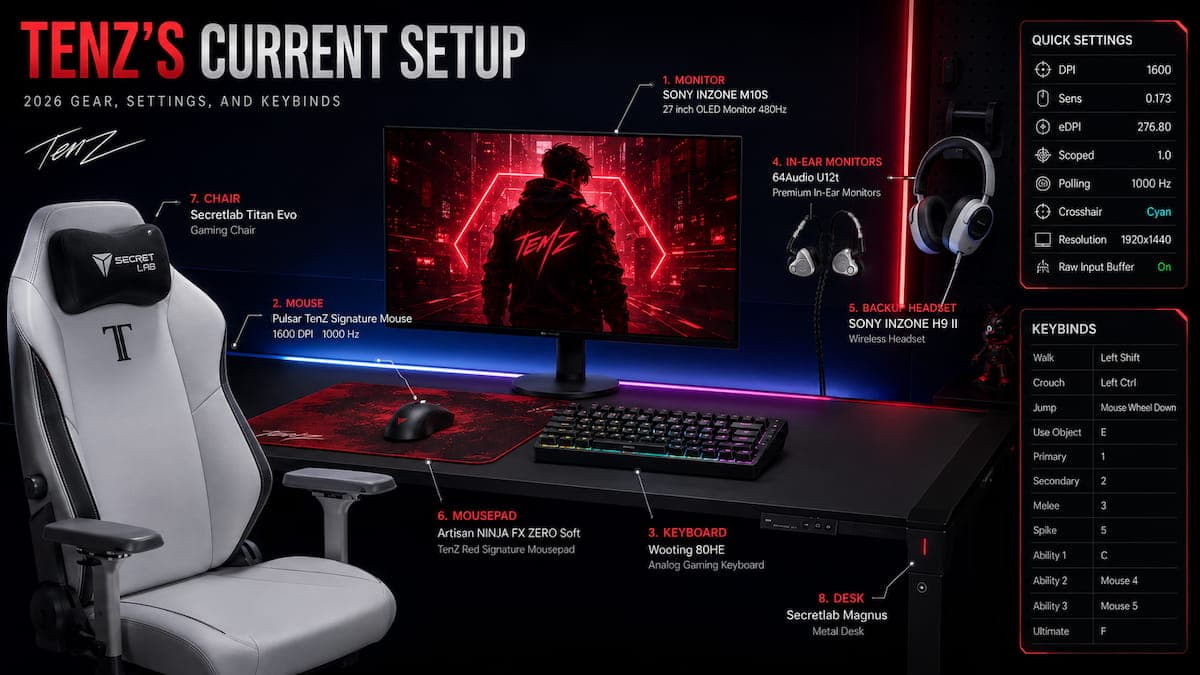
TenZ’s complete 2026 setup: SONY INZONE M10S monitor, Pulsar TenZ Signature mouse, Wooting 80HE keyboard, 64Audio U12t IEMs, and the brand-new Artisan NINJA FX ZERO Soft TenZ Red mousepad. All settings verified May 2026.
TenZ settings 2026 remain the most studied configuration in VALORANT, even though Tyson “TenZ” Ngo officially retired from professional play after VCT 2024. The Canadian former Sentinels superstar joined T1 as a content creator in 2026 and still streams daily to over 4.5 million Twitch followers. Furthermore, his current settings change just enough that copying the right version actually matters. Most guides online list outdated settings from 2022 or 2023. This guide gives you the verified 2026 configuration straight from TenZ’s official setup announcement and his brand-new May 2026 Artisan mousepad signature collaboration (last updated May 20, 2026), including sensitivity, crosshair code, complete gear list, and the exact keybinds he uses today.
TenZ switches gear and tweaks sensitivity more than almost any other notable VALORANT player. He has been documented using multiple mice in the past 18 months, and his eDPI has ranged between 144 and 384 across that same period. Therefore, this guide tracks his current confirmed setup and explains how to adapt his philosophy rather than blindly copying every value.
Before going into the detailed breakdown of TenZ settings 2026, here are the essential values you can copy right now:
| Setting | Value |
|---|---|
| Mouse DPI | 1600 |
| In-game Sensitivity | 0.173 |
| eDPI | 276.80 |
| Scoped Sensitivity | 1.0 |
| Polling Rate | 1000 Hz |
| Windows Sensitivity | 6 (default) |
| Raw Input Buffer | On |
| Crosshair Color | Cyan (#00FFFF) |
| Resolution | 1920×1440 (stretched) |
| Aspect Ratio | 16:9 (Fill method) |
| Display Mode | Windowed Fullscreen |
The eDPI calculation multiplies DPI by in-game sensitivity. TenZ at 1600 DPI × 0.173 sensitivity equals an eDPI of 276.80, which sits in the lower-medium range for VALORANT pros. The average VCT 2026 pro eDPI runs between 280 and 350, so TenZ sits just below that sweet spot. As a result, this configuration gives him exceptional precision for headshot lineups while maintaining enough speed for flicks.
The mouse settings in TenZ settings 2026 are where most players overthink things. The reasoning behind his 1600 DPI with 0.173 sensitivity choice is often misunderstood. It comes down to input latency. At 800 DPI, the mouse sensor sends position data at certain intervals based on polling rate. With 1600 DPI, that data becomes more saturated, which means the moment your hand moves, your crosshair moves on screen. The difference is only 2-3 milliseconds, but at TenZ’s level that gap decides duels.
Notably, his scoped sensitivity sits at exactly 1.0 across all weapons. This is the same value 76% of VALORANT pros use, particularly important for Operator-heavy agents like Jett or Chamber. Furthermore, keeping scoped sensitivity at 1.0 means your muscle memory translates directly between hipfire and ADS without any mental recalibration.
Importantly, Raw Input Buffer is enabled in his configuration. This bypasses Windows mouse acceleration entirely and gives you a direct 1:1 relationship between physical movement and cursor response. Indeed, this is the single most important mouse setting that has nothing to do with sensitivity, and TenZ has it enabled at all times.
Here is the exact crosshair code TenZ uses in his current VALORANT settings. Paste this directly into the VALORANT crosshair import field:
0;s;1;P;c;5;o;0;f;0;0l;2;0v;2;0g;1;0o;1;0a;1;0f;0;1b;0This crosshair is a small cyan plus sign with outlines enabled but at 0 opacity, no center dot, and no outer lines. Specifically, the configuration emphasises tight visual footprint so the crosshair never obscures your target’s head hitbox at any range. Furthermore, the cyan color (#00FFFF) provides high contrast against most VALORANT map environments and stands out particularly well against the Yellow (Deuteranopia) enemy outline color that TenZ uses.

| Setting | Value |
|---|---|
| Color | Cyan |
| Crosshair Color | #00FFFF |
| Outlines | On |
| Outline Opacity | 0 |
| Outline Thickness | 1 |
| Center Dot | Off |
| Show Inner Lines | On |
| Inner Line Opacity | 1 |
| Inner Line Length | 2 |
| Inner Line Thickness | 2 |
| Inner Line Offset | 1 |
| Movement Error | Off |
| Firing Error | Off |
| Show Outer Lines | Off |
Naturally, both Movement Error and Firing Error are disabled. This is a deliberate choice rather than a stylistic one. Specifically, turning off Movement Error keeps the crosshair static while you walk or run, which forces you to learn proper counter-strafing instead of relying on visual feedback. Indeed, turning off Firing Error doesn’t actually improve your spray accuracy. Instead, it simply removes the visual spread indicator, which TenZ prefers because it keeps the crosshair clean and trains disciplined shooting habits.
Interestingly, TenZ pairs his cyan crosshair with the Yellow (Deuteranopia) enemy highlight color. As a result, this combination maximises visual contrast in any lighting condition. The cyan crosshair stands out against yellow enemy outlines, and both colors avoid blending into common map backgrounds. Therefore, this is why many pro players adopt similar color combinations rather than the default red enemy color.
Currently, TenZ plays at 1920×1440 stretched resolution in Windowed Fullscreen mode on a 16:9 aspect ratio using the Fill method. His graphics settings are not maxed for performance like many guides claim. Instead, he keeps some quality settings enabled because his hardware can handle them. Below is the complete breakdown of his current video configuration:
| Setting | Value |
|---|---|
| Resolution | 1920×1440 (stretched) |
| Aspect Ratio | 16:9 |
| Aspect Ratio Method | Fill |
| Display Mode | Windowed Fullscreen |
| Setting | Value |
|---|---|
| Multithreaded Rendering | On |
| Material Quality | Low |
| Texture Quality | Low |
| Detail Quality | Low |
| UI Quality | Low |
| Vignette | Off |
| VSync | Off |
| Anti-Aliasing | MSAA 2x |
| Anisotropic Filtering | 2x |
| Improve Clarity | Off |
| Experimental Sharpening | Off |
| Bloom | On |
| Distortion | Off |
| Cast Shadows | Off |
| Setting | Value |
|---|---|
| Enemy Highlight Color | Yellow (Deuteranopia) |
Notably, TenZ does not strip every setting to the absolute minimum. He keeps Anti-Aliasing at MSAA 2x and Anisotropic Filtering at 2x, plus Bloom remains enabled. Indeed, the lesson here is that pro settings prioritise visibility and consistency over raw FPS once your hardware comfortably exceeds your monitor’s refresh rate.
Notably, TenZ has been famously inconsistent with his gear choices, which is partly why incorrect setups float around online. The setup below comes directly from his officially branded 2026 setup announcement, making it the most authoritative source available:
The Pulsar TenZ Signature Edition is a wireless, ambidextrous gaming mouse weighing just 47 grams. It uses an XS-1 sensor capable of up to 32,000 DPI with an 8,000 Hz max polling rate, although TenZ runs his at 1000 Hz. Specifically, the mouse measures 120mm long, 40.5mm tall, and 64mm wide, making it suitable for medium hand sizes with claw or fingertip grip styles. Furthermore, the 47g weight matters because TenZ plays with a claw/fingertip grip that benefits from minimal mouse mass.
The Wooting 80HE is a TKL (tenkeyless) analog keyboard with Lekker switches, hotswappable PCB, and RGB lighting. It uses Hall Effect switches that allow for Rapid Trigger actuation settings, which gives a significant advantage in tactical shooters requiring fast key presses. Specifically, Rapid Trigger lets keys reset the moment you lift your finger rather than requiring the key to return fully to its resting position. As a result, counter-strafing and rapid direction changes happen 10-30 milliseconds faster than with traditional mechanical switches.
TenZ uses the SONY INZONE M10S, a 27-inch 1440p OLED monitor with a blistering 480Hz refresh rate and 0.03ms GTG response time. The monitor supports G-Sync compatibility and uses an OLED panel for true blacks and near-zero pixel response times. As a result, TenZ now uses the highest refresh rate available in mainstream gaming monitors as of 2026.
However, you don’t need a 480Hz OLED monitor to improve at VALORANT. Moving from 60Hz to 144Hz or 240Hz produces a far more noticeable improvement for most players than going from 240Hz to 480Hz. Therefore, focus on hitting consistent frame rates above your monitor’s refresh rate before chasing the highest available hardware.
Specifically, TenZ uses the 64Audio U12t as his primary competitive audio choice. The U12t is a 12-driver universal in-ear monitor offering reference-level detail and impeccable spatial imaging. As a result, this gives him pinpoint positional audio accuracy for tracking footsteps and ability sounds across maps. The U12t retails around $2,000, making it a serious investment that represents the audiophile standard for competitive gaming audio.
For everyday streaming and casual sessions, TenZ uses the SONY INZONE H9 II wireless headset. The H9 II features active noise cancelling, a detachable microphone, and closed-back design. Meanwhile, the in-ear monitors take over for serious competitive sessions where positional accuracy matters most.
Breaking news from May 20, 2026: TenZ just announced his signature Artisan mousepad collaboration. The NINJA FX ZERO Soft – TenZ Red is his official branded version, made in partnership with Artisan (uNleashed_jp). Specifically, TenZ has been using Artisan mousepads for years and finally got to design his own version. The Soft surface provides smooth glide characteristics, and the red colorway matches his TenZ Signature branding across all his gear.
It took so much effort not to leak this but I teamed up with ARTISAN 😄
— TenZ (@TenZOfficial) May 20, 2026
I've been using their mousepads for so long, I'm really happy I got to work with them (@uNleashed_jp) to make my own version.
The NINJA FX ZERO Soft – TenZ Red is now available: https://t.co/3cdvwbAuo5 pic.twitter.com/ovRn0vaA4i
For seating, TenZ uses the Secretlab Titan Evo, the same chair used by countless esports professionals. The chair offers full lumbar support, adjustable armrests, and a 4D ergonomic design. As a result, this supports the long streaming sessions that come with being a full-time content creator.
TenZ rounds out his setup with the Secretlab Magnus metal desk. The Magnus offers a magnetic cable management system and a smooth metal surface that pairs well with his Artisan mousepad. Furthermore, the matte finish reduces glare from his RGB lighting and OLED monitor.

Interestingly, TenZ uses unique VALORANT keybinds that reflect his preference for mouse-side button utility:
| Action | Key |
|---|---|
| Walk | Left Shift |
| Crouch | Left Ctrl |
| Jump | Mouse Wheel Down (only) |
| Use Object | E |
| Equip Primary Weapon | 1 |
| Equip Secondary Weapon | 2 |
| Equip Melee Weapon | 3 |
| Equip Spike | 5 |
| Use/Equip Ability 1 | C |
| Use/Equip Ability 2 | Mouse 4 |
| Use/Equip Ability 3 | Mouse 5 |
| Use/Equip Ultimate | F |
The keybinds reflect interesting choices. Specifically, Jump is bound only to Mouse Wheel Down, not Spacebar. This is a clean CS:GO carryover that makes bunny-hopping and Spike-jump defuses easier with consistent timing. Furthermore, Ability 2 and Ability 3 are bound to Mouse 4 and Mouse 5, which lets him use abilities without lifting fingers off WASD. As a result, this is particularly powerful for agents like Jett where ability timing matters mid-movement.
Honestly, the answer is: use them as a starting framework, not a finished formula. TenZ has 15,000 hours of FPS muscle memory built across CS:GO and VALORANT. His eDPI of 276.80 works for him because his arm has been trained on that range for years. Therefore, copying the exact value without adaptation time will likely hurt your short-term performance.
Here is the realistic approach to using TenZ settings:
Adopt directly:
Adapt gradually:
Don’t copy without consideration:
Eventually, the goal is to find your own sweet spot using TenZ’s setup as a reference baseline. Specifically, expect 3-4 weeks of adjustment when switching to his eDPI of 276.80, especially coming from higher sensitivity. During the first week your aim will feel sluggish. Practice daily in Deathmatch and aim trainers, and don’t change settings again during this adaptation period.
Looking at how TenZ settings 2026 stack up against other top VALORANT pros gives useful context for understanding sensitivity ranges:
| Player | Team | DPI | Sensitivity | eDPI |
|---|---|---|---|---|
| TenZ (T1) | T1 | 1600 | 0.173 | 276.80 |
| Demon1 (Evil Geniuses) | EG | 800 | 0.35 | 280 |
| Aspas (MIBR) | MIBR | 800 | 0.4 | 320 |
| Jinggg (Paper Rex) | PRX | 800 | 0.42 | 336 |
| Derke (Vitality) | VIT | 1600 | 0.2 | 320 |
| Chronicle (Vitality) | VIT | 800 | 0.45 | 360 |
Indeed, the pattern is consistent: top VALORANT players settle in the 270-360 eDPI range. Some prefer 800 DPI with higher in-game sensitivity, others prefer 1600 DPI with lower in-game sensitivity. Naturally, the final eDPI ends up similar.
For context on how VALORANT pros adapted their settings during the 2026 competitive season, see our coverage of Vitality’s nightmare weekend across CS2 and VALORANT where Chronicle’s 222 ACS performance using his settings shows what’s possible at the highest level.
TenZ’s mechanical skill didn’t come from copying anyone else’s settings. Instead, it came from thousands of hours of deliberate practice using specific drills. Currently, his warm-up routine includes:
Aim training (15-20 minutes):
VALORANT practice (45 minutes):
The total daily warm-up sits around 60 minutes before stream content. Notably, most casual players skip this entirely and jump straight into ranked matches, which is why their aim feels inconsistent. As a result, even copying TenZ’s exact sensitivity won’t help if the muscle memory isn’t built through regular practice.
For more current VALORANT coverage, check out our VCT EMEA Stage 1 grand final recap and VALORANT news hub for the latest tournament results and patches.
The truth about TenZ settings 2026 is that they’re a starting point, not a destination. Specifically, his eDPI of 276.80 works for him because of years of muscle memory. His crosshair code translates to any player. His video settings give universal performance benefits when paired with appropriate hardware. Furthermore, his keybinds reflect CS:GO movement habits that genuinely help in VALORANT.
Copy the crosshair, copy the enemy color setting, try the video settings if your hardware can handle them, and consider his keybinds if they fit your hand. Then experiment with sensitivity to find your own sweet spot using 276 eDPI as a target. Importantly, give yourself three to four weeks of adjustment time. Practice daily with aim training and deathmatch. Don’t change settings during the adaptation period.
Eventually, after a month, your aim will feel sharper, your crosshair placement will improve, and you’ll understand which parts of TenZ’s setup genuinely help you and which were just stylistic choices for him. Indeed, that’s the real value of studying pro player configurations: not blind copying, but informed adaptation.
For the latest TenZ content and VALORANT pro player updates, check his official Twitch channel for verified settings updates whenever he changes his configuration. His YouTube channel also features regular settings showcases and gameplay highlights that confirm his current setup.
VALORANTHere’s a full guide to VALORANT Champions Shanghai 2026, including the storylines, teams, schedule, and how to watch.
 VALORANT
Here’s everything to know about Red Bull Home Ground 2026, including this year’s VALORANT teams, how to get tickets, and how to watch.
 VALORANT
If you’re new to the game, here’s a quick tutorial on how to unlock VALORANT Agents. You can get them for free or pay with in-game currency.