

 CS2
CS2Full Guide to Chicken Pets in CS2: How to Hatch, Drop Rates, All Colors
Here’s everything Counter-Strike players should know about the new Chicken Pets, including how to get them and all available colors.
23 Sept 20267 min
CS2GUIDESCS2 float value decides how a skin looks and what it sells for. Here are the wear tiers float caps and the pricing details most guides skip.
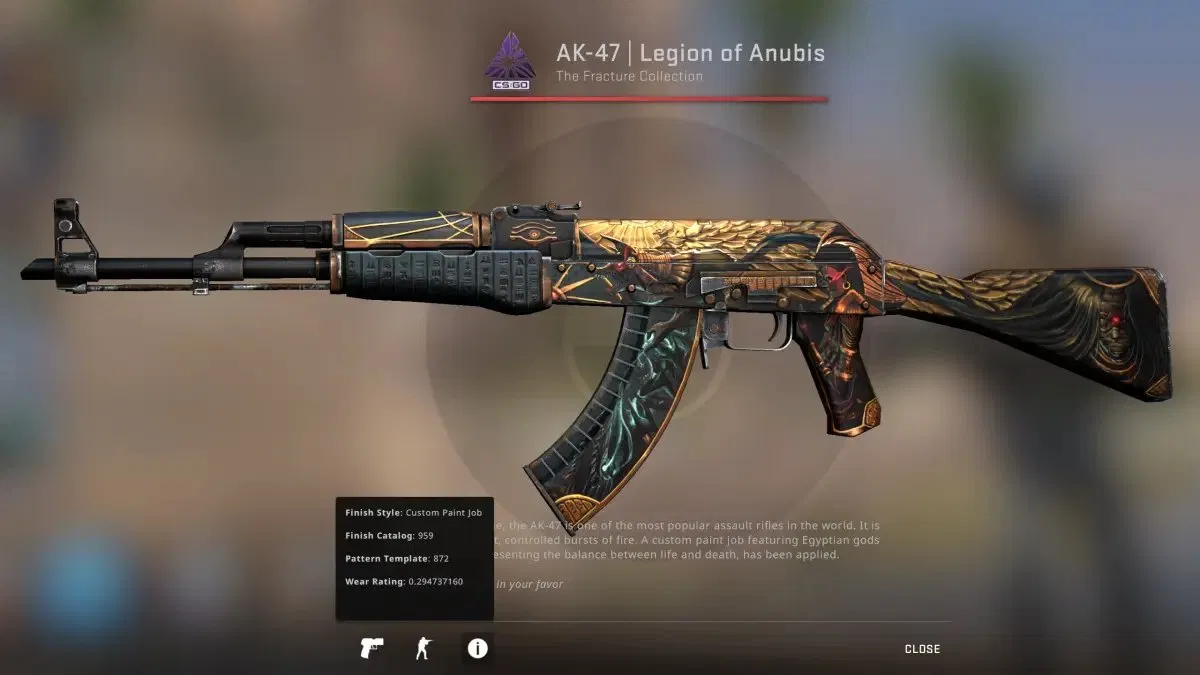
The in-game inspect screen shows a skin’s exact wear rating (float value), here 0.294 on a Field-Tested AK-47. Image: Valve.
Two AK-47 Redlines, same wear tier on the label, listed on the same marketplace a minute apart. One sells for $42. The other sits at $115. Nothing about the name is different. The only thing separating them is a number most new players never look at: the float value.
That number is the single most important thing to understand if you want to stop overpaying for skins or accidentally underselling your own. Most float guides give you a wear-tier table and stop there. The table is the easy part, and it is already everywhere. What actually costs people money is everything underneath it. Why do two skins in the same tier sell for wildly different amounts? Why are some Battle-Scarred skins worth more than their Factory New versions? And why can one decimal place swing a price by hundreds of dollars?
This guide covers the whole thing, from the basics to the parts traders argue about.
Every CS2 skin gets stamped with a float value the moment it enters the game, whether it came from a case, a trade-up contract, or a random end-of-match drop. It is a decimal between 0.00 and 1.00, and here is the key part: it never changes. You can trade the skin, rename it, apply stickers, or run it through ten thousand hours of matchmaking. The number stays locked exactly where it started.
The game engine reads that float to decide how much visual wear to paint onto the weapon. A skin at 0.01 looks almost untouched. One sitting up around 0.85 looks like it spent a season face-down on de_dust2. The gun fires identically either way, so float is purely a cosmetic and economic system. It changes nothing about how the weapon performs.
That permanence is what makes float the backbone of the entire skin economy. It is a fixed, verifiable trait on every single item, and the market prices around it constantly.
CS2 splits the 0.00 to 1.00 range into five named conditions. These are the ranges every marketplace uses, and they are worth memorising:
| Wear condition | Float range | What it looks like |
|---|---|---|
| Factory New (FN) | 0.00 – 0.07 | Clean, basically no visible wear |
| Minimal Wear (MW) | 0.07 – 0.15 | Light scratches, still sharp |
| Field-Tested (FT) | 0.15 – 0.38 | Visible wear, varies a lot by skin |
| Well-Worn (WW) | 0.38 – 0.45 | Obvious paint chipping |
| Battle-Scarred (BS) | 0.45 – 1.00 | Heavy wear, faded colour, metal showing |
Here is the detail people skip right past: these bands are not the same size. Field-Tested is enormous, stretching from 0.15 all the way to 0.38. Well-Worn is squeezed into a narrow 0.38 to 0.45.
What that means in practice is that the condition label alone tells you very little. A 0.16 Field-Tested can look nearly as clean as a Minimal Wear, while a 0.37 Field-Tested of the same skin looks almost Well-Worn. Both wear the identical “Field-Tested” tag. If you are buying anything worth real money and only checking the condition label, you are guessing at what you will actually receive.
Picture an AK-47 Redline at 0.16. It costs whatever the going Field-Tested rate is. Now drop that float to 0.15, and it crosses into Minimal Wear. The price jumps, sometimes significantly, even though your eye would struggle to spot any difference between the two.
The tier boundary is doing the work there, not the appearance. This catches newer traders off guard constantly. They will buy a 0.151 thinking they got a deal on a Minimal Wear. They never realise that 0.149 would have been the same skin for less, or that the 0.150 they paid a premium for looks identical to a cheaper 0.16.
At the bottom of the scale, skins in the 0.000x range get their own nickname: triple zeros. These get tracked on global float databases, and the market treats them as genuinely separate items. A triple-zero Karambit Fade can sell for several times what a clean 0.01 goes for.
That sounds insane until you reframe it. To a collector, the #1 lowest-float version of a popular skin is a status symbol, not just a cleaner texture. For the record, the highest float ever recorded on any CS2 skin is a P250 Sand Dune at 0.9999863, about as close to 1.00 as the system physically allows.
Not every skin uses the full 0.00 to 1.00 range. Valve hardcoded restricted float ranges into many skins, which traders call float caps. This trips up a lot of people, so here are some common examples:
| Skin | Float range | Result |
|---|---|---|
| AK-47 Redline | 0.10 – 0.70 | Can never be Factory New |
| AWP Asiimov | 0.18 – 1.00 | No FN or MW versions exist |
| AWP Fade | 0.00 – 0.08 | FN and MW only |
| Doppler knives | 0.00 – 0.08 | Almost all Factory New |
| Rust Coat finishes | 0.40 – 1.00 | Only WW and BS, by design |
This changes how you read a wear label. A Field-Tested AWP Asiimov at 0.18 is sitting at the absolute cleanest that skin can physically be. Traders price it as the “Factory New equivalent” even though the Field-Tested tag would normally suggest middling wear.
Newer traders sometimes scroll past a low-float capped skin because the wear tag looks unimpressive. That is a genuine missed opportunity once you understand what the cap means. The label says Field-Tested; the reality is the best version that exists.
This is the most overlooked part of float, and it matters more than most traders realise. CS2 uses several different finish styles, and float does not affect them the same way at all.
Custom paint jobs like the AK-47 Vulcan or M4A1-S Hyper Beast wear by scratching. Higher float means more bare metal showing through where the paint has chipped. This is what most players picture when they imagine skin wear.
Patina finishes like the AK-47 Case Hardened, AWP Medusa, and Desert Eagle Kumicho Dragon do not scratch in the traditional sense. Instead they darken and lose saturation as float climbs. A Battle-Scarred Case Hardened keeps its entire blue pattern intact; it just looks deeper and dimmer. That is exactly why blue-gem patterns get collected even in Battle-Scarred condition.
Gunsmith finishes like the AK-47 Empress or M4A1-S Decimator mix both behaviours. Parts scratch while other parts shift tone, which can be confusing until you know what you are dealing with.
Here is where it pays off. A Battle-Scarred patina skin can genuinely look better than its Factory New version in some cases. The clearest example is the AWP Asiimov above roughly 0.95 float, where the scope turns completely black. The community calls it the “Blackiimov,” and it sells for several times the normal Battle-Scarred price. Knowing the finish type tells you instantly whether high float will tank a skin’s value or create a premium.
In-game, right-click any skin in your inventory and hit inspect. The float value shows up alongside the finish style and pattern template.
For trading, you need a dedicated float checker. Tools like CSFloat or the checkers built into most marketplaces let you paste a Steam inspect link and pull the exact decimal, the paint seed, and the item ID. This matters because the Steam Community Market only shows the wear label, never the actual number, which makes it close to useless for serious buying on its own.
The workflow before any real purchase is simple:
Most third-party marketplaces let you sort listings by float directly, which is how people hunt down low-float skins to flip or collect. Once you start paying attention to the exact number, it is genuinely hard to go back to buying blind.
Trade-up contracts use float too, and the system got reworked in late 2025. The output is no longer a simple raw average. The game now normalises each input skin to a universal 0 to 1 scale based on that skin’s own float cap range, averages those normalised values, then maps the result onto the output skin’s float range.
The practical takeaway is straightforward. Low-float inputs give you better-condition outputs, and the gap between a Factory New and a Field-Tested version of the output skin can be hundreds of dollars. The old system averaged raw floats, which let capped skins like the M4A1-S Knight skew the math; the rework normalises that out so every skin contributes fairly regardless of its cap.
Do not try to calculate this by hand with float caps and collection odds both in play. Calculators on CSFloat, Pricempire, and similar tools handle the math for you. If you want the full breakdown of safe trading mechanics, our guide to trading CS2 skins safely walks through the whole process.
At the extreme ends of the float scale, the market runs on different logic than normal trading.
Float rankings. If your skin holds the #1 lowest float globally for that specific item, the premium can be many times the base price. Top-10 and top-50 rankings carry some extra value too, though it drops off fast after the first few spots. These rankings update in real time as new skins enter the market, so a #1 spot is not always permanent.
FN-look skins. A 0.0699 Minimal Wear that looks identical to Factory New gets called an “FN-look” skin, and it sells for more than a standard Minimal Wear. You get the visual quality of Factory New without paying the Factory New price. For players who care how their loadout looks but do not want to overpay for a label, this is one of the smartest plays in the float market.
Max-float collecting. The highest possible float on a given skin gets collected the same way the lowest does. A record-holding max-float item carries a rarity premium. That P250 Sand Dune at 0.9999 is not worth much in absolute terms, but it is worth far more than a regular Battle-Scarred Sand Dune.
A few errors show up constantly, and all of them are avoidable:
The general rule: pay extra for float only when it delivers a visual advantage the market actually rewards. That usually means painted finishes where scratches are obvious, or skins sitting right at a tier boundary.
Float values are critical, but they are not the whole story. The best trades come from balancing float against pattern, rarity, sticker value, and current market demand. A perfect-float skin in a dead collection is still a hard sell, while a mid-float skin with a rare pattern or a sought-after sticker combo can outperform a cleaner version.
Always inspect before you trade, learn what finish type you are dealing with, and trust your eye alongside the numbers. For more on reading condition specifically, see our CS2 skin wear levels guide, and if you are weighing knives as investments, our top 10 CS2 knife skins guide covers which ones hold value.
Does float value change over time or with use? No. Float is permanently set when the skin is created and never changes, no matter how long you use the skin, trade it, or apply stickers.
What is the lowest float you can get? The system allows floats approaching 0.00, but in practice most skins have a hardcoded minimum (float cap). Doppler knives cap around 0.00 to 0.08, while skins like the Redline never drop below 0.10.
Is a lower float always worth more? Usually, but not always. On patina finishes like Case Hardened, higher floats can preserve or even boost value, and threshold skins like the Blackiimov are worth more at high float. Finish type decides the rule.
Where can I check a CS2 float value? In-game via right-click inspect, or through a float checker like CSFloat where you paste a Steam inspect link to see the exact decimal, paint seed, and item ID.
Why are two skins with the same wear tier priced differently? Because the exact float inside the tier varies, and so do pattern, stickers, and float ranking. A 0.16 and a 0.37 are both Field-Tested but look and sell very differently.
Float is the number that quietly decides what every skin in the game looks like and what it is worth. Learn the five tiers, understand that they are not equally sized, check the exact decimal before you buy, and pay attention to finish type and float caps. Do that, and you stop being the person overpaying for a meaningless label, and start being the one spotting value everyone else walks past.
For everything else skin-related, our CS2 skins hub tracks guides, market updates, and trading advice throughout 2026.
CS2Here’s everything Counter-Strike players should know about the new Chicken Pets, including how to get them and all available colors.
 CS2
CS2Here’s everything CS2 esports fans should know about fl0m’s iBUYPOWER Masters FML 2026, including its teams, format, and how to watch.
 CS2
CS2Valve has reportedly shut down a CS2 skinchanger website, serving a legal cease-and-desist. What does this mean for Counter-Strike?