How to Customize the Lady Loki Skin Animations in Marvel Rivals
After Season 9.5, Marvel Rivals players can change the Lady Loki skin’s animations. Here’s a quick tutorial on how to do it.

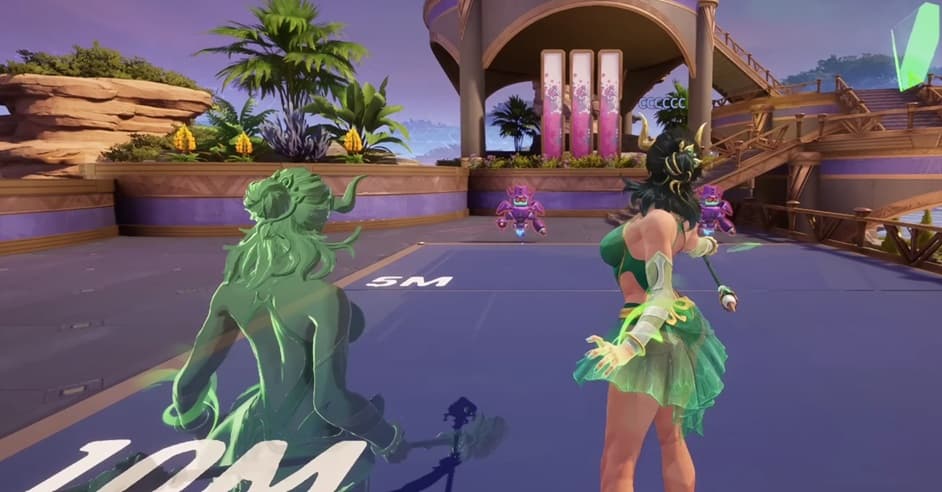
A new Lady Loki update lets Marvel Rivals players customize her animations. Image Credits: @MarvelRivals via YouTube
Lady Loki brings mischief to the Marvel Rivals battlefield with a brand-new, elegant costume. After recent community discussion, Marvel Rivals has added a custom animation option to the skin. Here’s a tutorial on how to change Lady Loki’s animations after Season 9.5
Can You Change Lady Loki’s Animations in Marvel Rivals?
When Lady Loki arrived in the game, she shared the same walk style with the original Loki model. This brought forward some criticism from fans, who felt the animation looked awkward on the new sprite. Many netizens said it clashed or conflicted with her garments, ability animations, and VFX.
Luckily for Loki mains, you can change Lady Loki’s animations. The update arrives after the Season 9.5 patch, which shakes up the meta with other updates like a Clan of Akkaba event and new hero The Hood.
lady loki’s new running animation looks so much better! the arm really makes the difference
— Dako (@DAKO_tsi) August 5, 2026
Marvel Rivals announced the move in its Season 9.5 Dev Vision update. Creative Director GuangGuang said:
“The Goddess of Mischief is getting a flair upgrade. We are rolling out exclusive, toggleable movement and ability animations for Lady Loki, which you can customize.”
He also showed an example of Lady Loki’s new walk cycle. Her stride, arm positions, and ability use all look a lot different.
Do I Have to Change Lady Loki’s Animations?
If you like the old Lady Loki animation, you can still keep it! Whatever floats your boat is fine. The old animation cycle isn’t going away, and the devs have no plans to remove it anytime soon.
Also, the animation changes won’t affect your gameplay. Lady Loki is still the same ol’ Strategist she’s always been. It’s a purely cosmetic change.
How to Change Lady Loki’s Custom Animations in Marvel Rivals

To change Lady Loki’s Marvel Rivals animations, follow these simple steps:
- Open Marvel Rivals.
- Go to the ‘Heroes’ Page.
- Click on Loki.
- Click on ‘Cosmetics’ on the top bar near the middle of your screen.
- Click on ‘Costumes.’ This should appear in a bar below and slightly to the left.
- Click on the Lady Loki costume.
- A toggle option should appear. If you want the new animations, turn the toggle ON.
- Save and exit.
You can repeat the process to change Lady Loki back to her original animations. You can customize the whole experience, picking which animations you want.
It’s important to note that the animation rework has a release date of Friday, August 14. Before that, the toggle option will not appear, so you’ll have to wait a little longer if you want to update Lady Loki’s look.
Stay tuned for more Marvel Rivals esports and in-game news!