
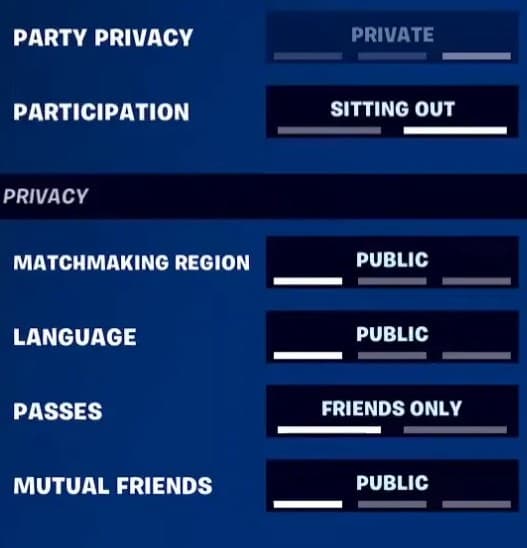
Fortnite has a Sit Out mechanic that lets players spectate matches. Image Credits: Epic Games
Fortnite’s Sit Out feature is easy to use, and it lets you chill with friends while watching them play. Here’s a quick tutorial on how to use it, and answers to the community’s most frequent questions.
Can You Spectate Friends in Fortnite?
Yes, you can spectate your friends in Fortnite without playing! This feature is called ‘Sit Out.’ It’s built into the game, so you don’t have to worry about making your teammates wait for you.
The Sit Out feature lets you take a break from playing without leaving your squad behind or exiting the party. Instead of quitting the lobby or letting your friends wait around, you can flip your status from Playing to Sitting Out. You’re still technically connected to the party, so you can still chat with your squad.
While in Sit Out, you’re able to watch your party members in their games. You can come back from the status at any time if you want to jump back into the action. It’s especially handy for quick food breaks or bathroom runs. Sitting Out is also good for making room when a squad or trio only has a set number of spots and a friend wants to jump in for a round.
Squads use Sit Out after getting wiped out too, since it lets everyone Ready Up for the next match without forcing players who need a moment to rejoin right away. In other words, you can Ready Up while someone is in Sit Out mode in your party, and start a game without them being active. It’s a small feature on the surface, but it does a lot to keep Fortnite’s social experience running smoothly. After all, it takes a whole crew of friends to fill the Battle Bus, and buddies who Battle Royale together stay together.
How to Sit Out in Fortnite

It’s super easy to Sit Out in Fortnite. The feature has been out for a while, so it’s pretty reliable. You just need to follow these instructions:
- Enter a Fortnite lobby. This needs to have multiple players in it, so a squad, a trio, or a duo.
- Click the Profile button in the top corner of your screen. The icon for this changes depending on what platform you’re on: PlayStation uses Options, Xbox uses Menu, Switch uses Plus, and PC uses the three-line icon in the corner.
- Here, you’ll see a Participation button. Click on it to change your Participation status from Playing to Sit Out.
- You can leave Sit Out and return to Playing at any time by using the same process.
There is no limit to how many times you can toggle Sit Out in one session. You can use it as much as you want, leaving and re-joining an active party whenever.
Will I Earn XP in Sit Out in Fortnite?
Earning Fortnite XP can help you level up, unlock new skins and cosmetics, and complete events. Unfortunately, you will not gain any Fortnite XP in the Sit Out mode, even if your teammates are actively in a game. Your Sit Out experience also won’t impact any of your Fortnite ranks or accomplishments.
Can I Still Voice Chat in Fortnite Sit Out?
Yes, you can still use the built-in Fortnite Voice Chat feature while you’re in Sitting Out mode in a party. It won’t impact your ability to communicate with friends.
Will Sitting Out Remove Me From the Fortnite Party?
Nope! You’ll stay in the squad’s Fortnite party when you’re in Sitting Out mode. The server won’t automatically kick you or remove you in any way.
Why Am I Sitting Out in Fortnite?
Sometimes, Fortnite automatically sends you into Sit Out or Sleep Mode. This usually happens if your account is inactive for a long period of time. Sleep Mode automatically triggers after 15 minutes.
Usually, you’ll get an in-game pop-up asking, “Are you still here?” The pop-up will give you an option to Ready Up. If you don’t Ready Up within a short time, you’ll automatically move to a Sitting Out status.
A lot of players report being automatically put into Sit Out mode. This is not anything to worry about. You can jump back into the game easily by going back to your Profile and toggling your status to Playing.
Can I Turn Off Sit Out or Sleep Mode in Fortnite?
No, you can’t disable the Sit Out mechanic or Fortnite’s AFK detection. However, netizens say you can sometimes prevent going AFK by leaving your text box open with a bit of text typed in it.
Sit Out can be frustrating if you didn’t mean to go AFK, but it helps protect the game’s competitive integrity. The automatic AFK protection makes sure you and your squad aren’t stuck playing with a teammate who can’t contribute to the win.
Stay tuned for more Fortnite esports and in-game news.